


Stop Digging Through Your CRM. Just Ask Claude.
Here's a question we used to get from each other about twice a day: "Where are we with Acme?" Answering it meant opening the CRM, finding the account, clicking into the open opportunity, scrolling the notes, checking whether there was a ticket, and then summarizing all of it out loud. Five minutes, every time, for a question that has a two-sentence answer.
You can now connect Claude to your CRM and get that two-sentence answer by asking for it in plain English. Hey Customer is listed in Claude's connector directory, so connecting takes a sign-in, not a setup project. That changes how often a small team actually looks at its own customer history.
Most of what you know about your customers is one question away and five clicks deep
A CRM is good at holding things. It's less good at answering the question you actually have, because that question almost never lines up with one screen. "Where are we with Acme?" lives across an account, two contacts, an opportunity, a support ticket, and a dozen notes. The data is all there. Putting it together is your job.
- The question that crosses records. "Which of my open opportunities belong to accounts with an open ticket?" is a reasonable thing to want to know before a sales call. On most CRMs it's two lists and a squint.
- The question asked from somewhere else. You're already in Claude, drafting an email to a customer. Switching tabs to look up the last thing they said breaks the thread you were in.
- The question nobody bothers to ask. "Has anyone talked to them since the proposal?" gets skipped because looking it up isn't worth the interruption. That's how opportunities go quiet.
None of these is hard. Each one just costs a few minutes and a context switch, and small teams pay that tax dozens of times a week.
What connecting Claude to Hey Customer actually does
Hey Customer runs an MCP server, the standard way AI assistants like Claude and ChatGPT connect to outside software. Once it's connected, Claude can read your accounts, contacts, leads, opportunities, tickets, and the notes on them, and answer from what's really in your records instead of guessing.
Here's what it can look up:
- Search across everything. One search covers accounts, contacts, leads, opportunities, and tickets. Contacts also match by email address, and tickets by subject or by number, like #94.
- Filtered lists. Your open tickets. Opportunities assigned to you that are still active. Won opportunities on one account. Leads in a given status.
- The full record. Any single account, contact, lead, opportunity, or ticket, with its details.
- The notes. The discussion on an account, lead, opportunity, or ticket, newest first.
- A link back. Every record comes with its address in Hey Customer, so Claude's answer can send you straight to the page when you want to act on it.
So "Where are we with Acme?" becomes one question, and Claude reads the account, the opportunity, the ticket, and the latest notes on its own. "Summarize what happened with my open tickets this week." "Draft a check-in to the contact on our biggest active opportunity, based on the last note." The assistant does the clicking. You do the deciding.
Listed in the Claude directory, which means no setup
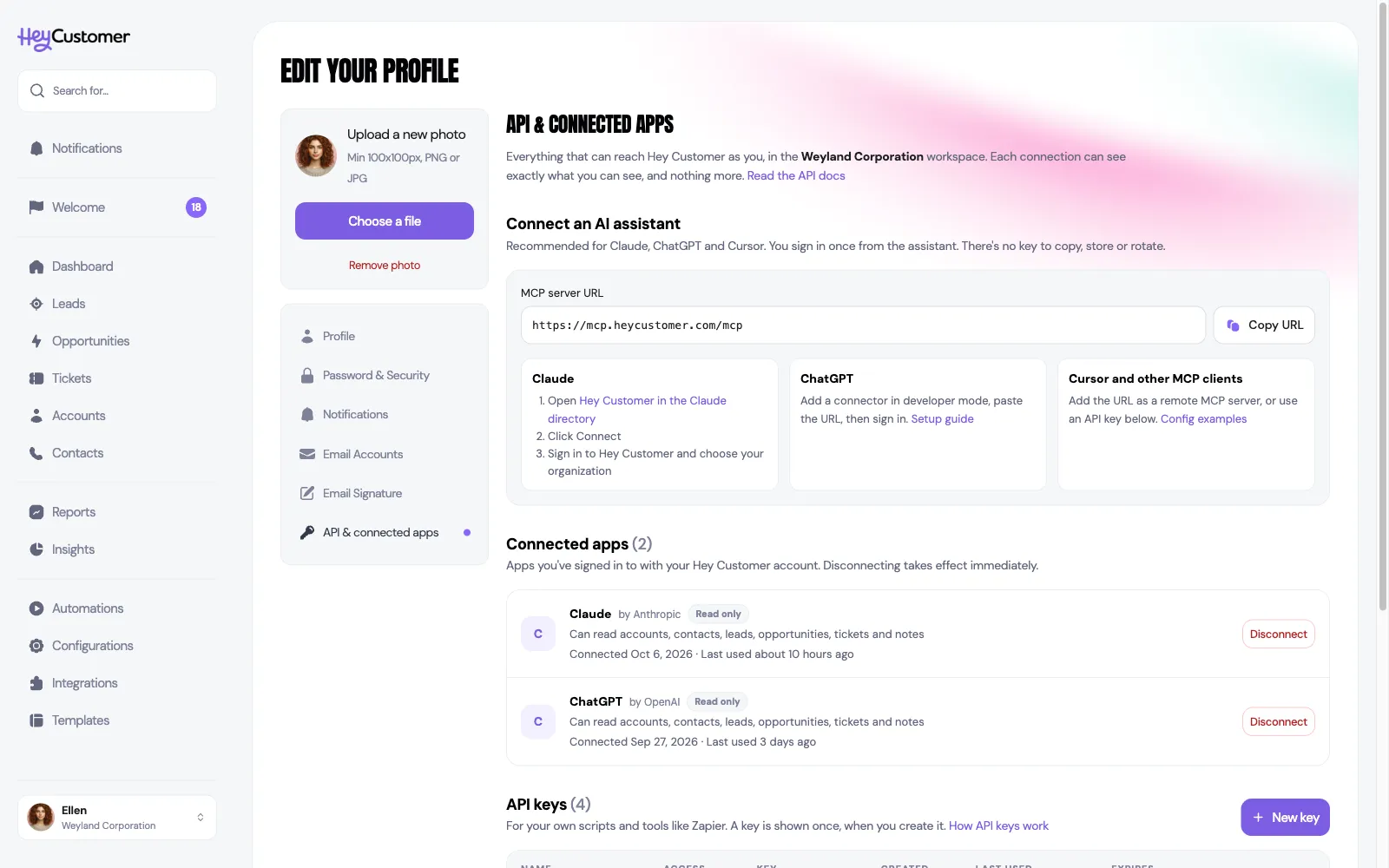
Claude keeps a directory of connectors that people add from inside Claude, and Hey Customer is in it. There's no address to paste and no key to copy. You open the Hey Customer listing, sign in with your Hey Customer account, pick which organization Claude should see, and approve. That's the whole thing.
Other assistants work too. ChatGPT connects through its developer mode. Claude Code, Cursor, and other MCP clients connect by signing in or with a personal API key. Every one of them uses the same server at the same address, and the organization is chosen when you sign in, never baked into a URL. Step-by-step instructions for each assistant are in Connect Claude, ChatGPT and other AI assistants.
It sees exactly what you see. Nothing more.
Handing customer records to an AI assistant should make you ask a few questions. Here are the answers, plainly.
It's read-only. Every tool Claude gets from Hey Customer reads. None of them create, change, or delete a record. An assistant can't move an opportunity's status, close a ticket, or send anything to a customer.
It has your permissions, not more. A connection acts as you, in one organization. It sees the records you can see in the web app, and never another person's private notes. If your role can't see an opportunity, neither can your assistant.
Someone has to allow it. Connecting an assistant needs the "API keys & AI assistants" permission on your role. Remove that permission, or the person's membership, and the connection stops at once.
You can see and end every connection. Each person sees their connected assistants under Profile, and an administrator sees every connected assistant in the organization under Configurations → Security, with a button to disconnect it. A connection nobody has used for 90 days ends on its own.
The consent screen tells you who's asking. Before you approve, it names the app and where it will send you back. Anything that isn't Claude or ChatGPT is labeled "Unverified app," so a lookalike doesn't get a free pass.
When you don't need this
We'd rather be useful than sell you something, so here's the other side. If nobody on your team uses Claude, ChatGPT, or another assistant day to day, this adds nothing; the web app already answers every question, just with more clicks. If your company has a policy against sending customer information to an AI provider, follow the policy. Records Claude reads to answer you go to Anthropic under your own Claude account, the same as anything else you paste into a chat.
Two more limits worth knowing. Because it's read-only, Claude can tell you a ticket needs a reply but can't log the call or update the record afterward; that part still happens in Hey Customer. And an assistant is only as good as what's been recorded. If your team doesn't log calls and notes, Claude will give you a confident summary of an incomplete story. Read the answer the way you'd read a colleague's quick summary, and click through to the record before you act on anything that matters.
The takeaway
The question you ask most about a customer is usually simple, and the answer is usually already in your CRM, spread across five screens. Letting an assistant read those screens for you turns a five-minute lookup into a sentence, and a question you'd have skipped into one you actually ask.
That's what the Hey Customer connector in Claude's directory is for: sign in once, and Claude can search and read your accounts, contacts, leads, opportunities, tickets, and notes with exactly your permissions. It's included in the same $10 per user per month plan as everything else, with a 30-day free trial to try it on your own customers. See everything that's included. If you'd rather ask for a report than for an answer, we also wrote about building a report by describing it in plain English.