


Stop Waiting on the Report. Just Ask for It.
For years, the report we most needed was the one we never built. We'd know exactly what we wanted — leads that had gone three days without a reply, tickets nobody had touched since the weekend — and then sit down at the report builder and lose ten minutes deciding which module it belonged to, which of a dozen fields to show, which comparison matched "gone quiet." By the time the report existed, so did the fire it was supposed to catch.
The report you need most is probably the one you never built, because building it meant learning columns, filters, and sort orders nobody remembers a week later. The bottleneck was never the data — every field we needed was already sitting in the system. It was translating an ordinary question into the specific shape a report tool asks for, and that's a different skill than knowing what you want to see.
Report building is a skill, and most small teams only have one person who has it
Ask a five-person team who builds the reports and you'll usually get one name. Not because reporting is hard — because somebody sat down once, learned which filter operator does what, and has been the default ever since. Everyone else asks that person instead of learning it themselves, and an ordinary question turns into a request that waits for whenever they have five minutes.
- The request that outlives the urgency. By the time the report gets built, the thing it was supposed to catch has already happened, or already passed.
- The report that only gets built right once. Ask for it again next quarter and whoever built it has to remember which filter did what.
- The question that never gets asked at all. Most "I wonder how many..." questions die quietly, because building the answer isn't worth the interruption.
What changes when you can just say what you want
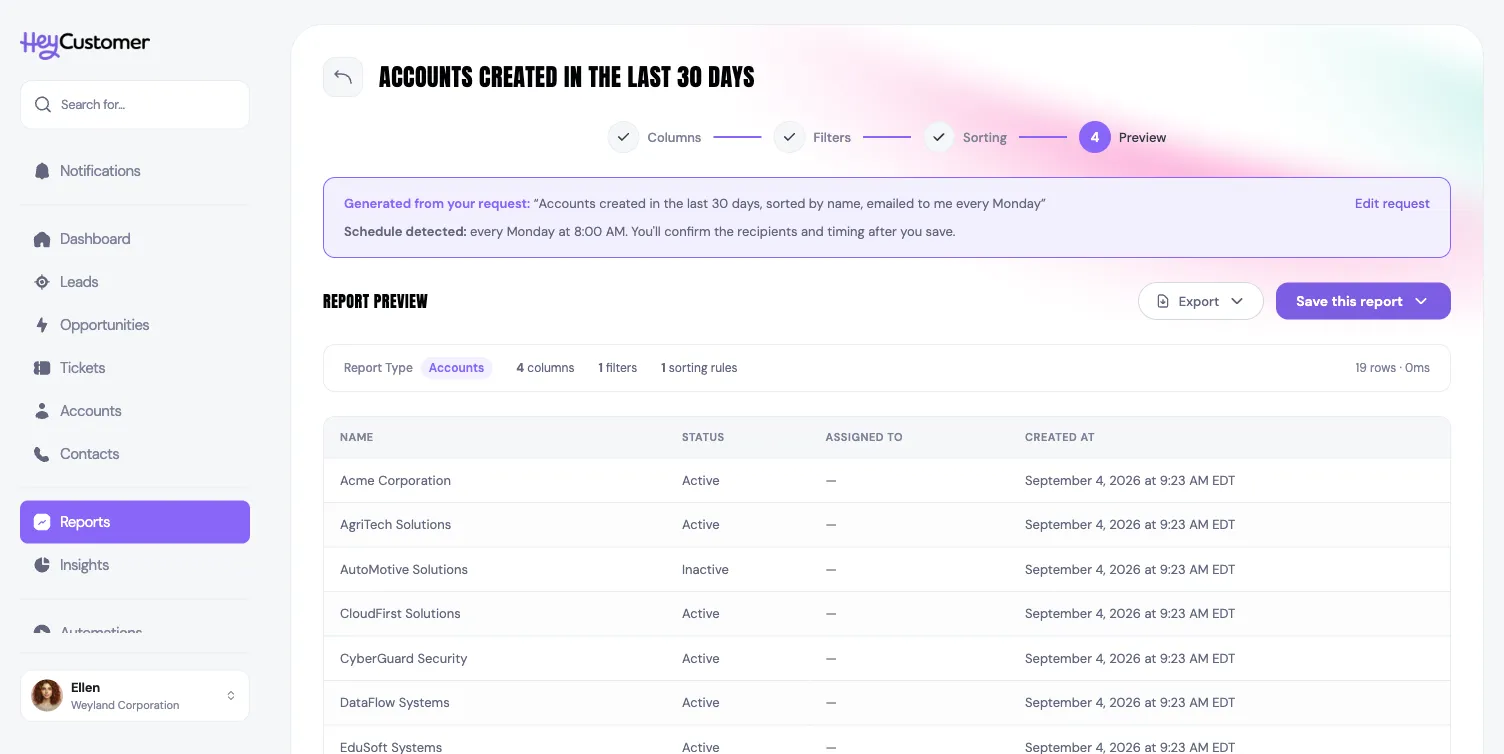
Hey Customer's Reports page carries a plain box next to the report list: describe what you want, in the words you'd use asking a coworker. "Open tickets assigned to me, oldest first." "Accounts created in the last 30 days, sorted by name, emailed to me every Monday." Press Generate, and Claude — Anthropic's model — reads that sentence and turns it into the same report definition the manual wizard produces: which record type it's about, four to six columns that make it readable, the filters and the exact operators behind them, and the sort order, all landing straight on the same preview screen the wizard builds.
Say something about delivery and it's read too. "Emailed to me every Monday" is detected as a weekly schedule at 8:00 AM; "end of month" becomes the 28th. Nothing is actually scheduled yet — saving the report opens the delivery form pre-filled with that day and time, so you still confirm the recipients and the timing before anything goes out. Say nothing about delivery, and the report just opens for you to look at, export, or save like any other.
None of the result is hidden. Every column, filter, and sort rule is visible and editable before you save it — the same fields you'd have picked by hand, filled in faster than you'd have remembered how to pick them.
What actually reaches the AI, and what doesn't
Any small business handing customer questions to an AI model should ask what that model actually sees. The honest answer here is narrower than it sounds: Claude gets your request sentence, the record types your organization uses, and a catalog of field names and types — "ticket priority: known values High, Medium, Low," "assigned to: team member name." That's what it needs to build a report shape. It never gets an actual customer, contact, account, or ticket. A field like "assigned to" is described as a kind of value, not populated with your team's real names; "account name" is described the same way, never filled in with your actual accounts. The box says as much right on the page: field names only, records never leave Hey Customer.
What comes back from the model is checked again before it becomes a report — every field, filter, and operator validated against what your organization's report builder actually supports. The AI's job starts and ends at translation, from a sentence to a report shape. Running that shape against your records happens entirely inside Hey Customer, the same way it does for a report you build by hand.
When you still want the wizard
We'd rather be useful than sell you something, so here's the other side. If you already know exactly which four columns and two filters you want, clicking through the wizard is probably faster than typing a sentence and checking the result. A plain-English request only composes what the report builder can already do — it won't invent a grouping or a calculation the wizard doesn't offer, because it's built from the same parts. And if the request is genuinely ambiguous ("show me the good ones"), expect a clarifying question back instead of a guess; it's worth reading the preview before you save anything you're about to schedule into a customer-facing inbox.
The takeaway
The report a small business needs most is rarely exotic. It's an ordinary question — who's gone quiet, what's overdue, what closed this month — that somebody has to translate into a tool's language before it becomes visible. Remove that translation step and the report stops depending on whichever one person remembers how the filters work.
That's what the plain-English request box on Hey Customer's Reports page is for — infer the columns, filters, sort order, and even the delivery schedule from a sentence describing what you want, without your customer data ever leaving the building to get there. It's part of the same $10 per user per month plan as everything else, with a 30-day free trial to try it on your own reports — see what's included. If Monday mornings are where this matters most, we also wrote about why a dashboard should tell you what to do today, not just report on yesterday.